
PETSHOP POCKET - Toys HASBRO - Free user manual and instructions
Find the device manual for free PETSHOP POCKET HASBRO in PDF.


User questions about PETSHOP POCKET HASBRO
0 question about this device. Answer the ones you know or ask your own.
Ask a new question about this device
Download the instructions for your Toys in PDF format for free! Find your manual PETSHOP POCKET - HASBRO and take your electronic device back in hand. On this page are published all the documents necessary for the use of your device. PETSHOP POCKET by HASBRO.
USER MANUAL PETSHOP POCKET HASBRO
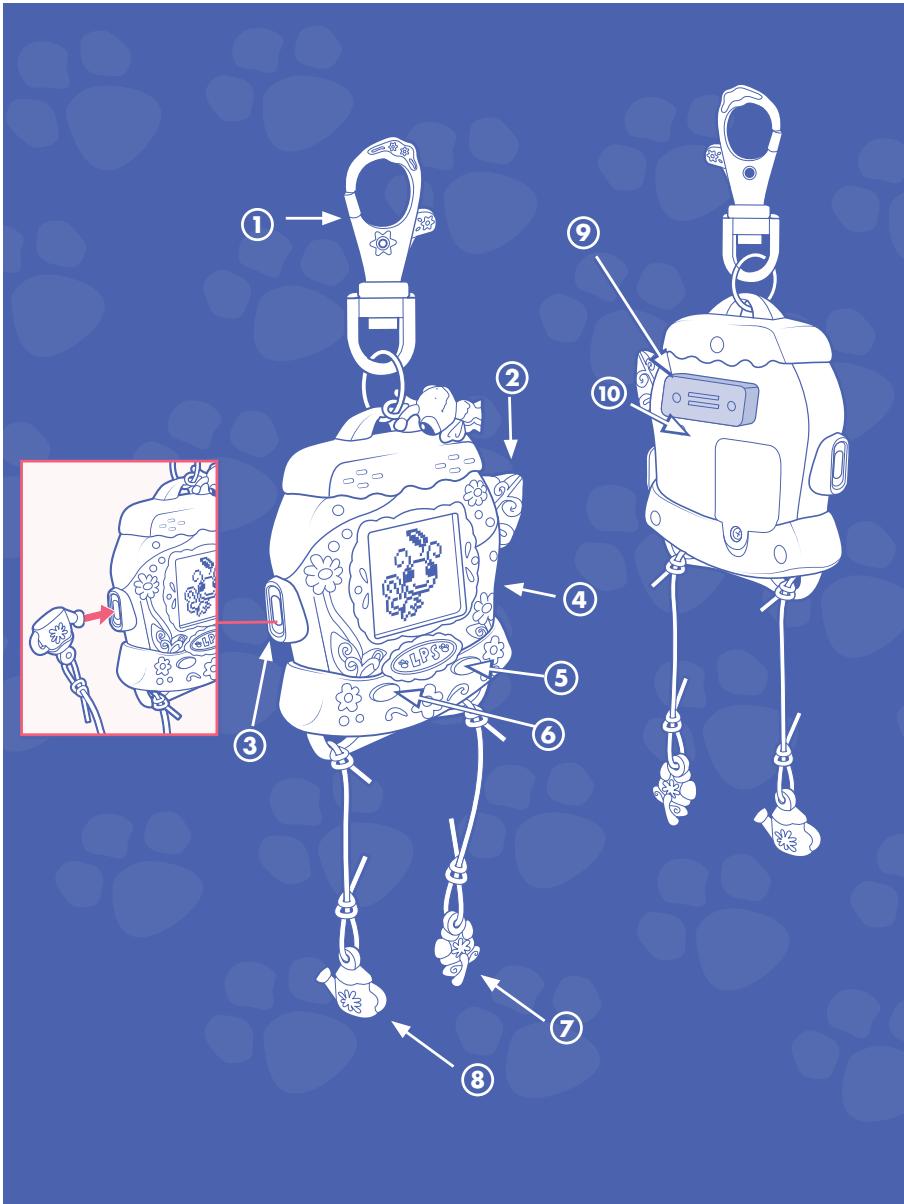
1 Backpack clip
2) Button - Lets you play with your pet
3 Grooming port
(4) Food port
5 Select/enter
6 Browse/move
(7) Food charm - Insert to feed your pet
(8) Grooming charm - Insert to groom your pet
9) Connection ports - Connect other electronic pets here
(10) Reset button
A PLAY MODE
Your toy comes packaged in "TRY ME" mode. To switch it to "PLAY" mode, just touch either one of the charms to its port during the "TRY ME" animation. After 2 minutes of non-activation, the toy will shut off. To turn back on, just touch one of the buttons on the front of the toy. All your game information, including stickers and stamps, will still be saved.
B HOW TO PLAY
10 little pets have escaped from the shop! It's up to you to find them all!
As you travel through locations, listen for a little pet crying! That's a sign you are near a lost pet. Locations include: Town, Park, Farm, Pond, Island, Forest, Beach, Stream and Lake.
When you find a lost pet, it will return to the shop and its habitat. A number on the screen will tell you how many pets are left to find.
As you look for the pets, you also will find numerous mini-games to play. Some games have a time limit (for example, staying on a surfboard for a certain number of seconds), and some games require you to perform a task a certain number of times (for example, catching a flying disc).
You will also meet many of your Littlest Pet Shop friends, who will invite you into their homes and play games with you!
To restart the game, press the RESET button. Or continue to explore and play more games!
If your pet isn't playful, it wants some attention. Use the groom charm to groom your pet, then press the toy button and play together - your pet will perk right up!
Be sure your pet is well-fed. Use the food charm to feed it. When your pet is feeling full, it'll shake its head when you try to give it more food. If your pet is hungry, it may move slowly.
To move your pet around, use either button to move through locations on the screen. For tips on playing all the different activities, go to littlestpetshop.com!
Your pet will always let you know what to do to keep it healthy and happy.
If your pet starts to move slowly, it's hungry! Use the food bowl charm to feed it. When it's full, it'll shake its head when you try to give it more food.
If your pet doesn't respond when you choose an activity, it's lonely and wants to play with you. Press the toy button and play together - your pet will perk right up!
If your pet turns its back to you, it needs some attention. Use the brush charm to groom your pet and make it happy again!
If your pet disappears from the screen... use either button to search for your pet. After a few clicks, you'll find it at home... using the facilities! Click either button to "clean up" after it, and your pet is ready to play again!
TROUBLESHOOTING
If toy does not respond, press the RESET button (you will need to use a pen or paperclip). All your pet's stickers and stamps will be saved. (To reset sticker and stamp info, press RESET button while holding down both left and right buttons on front of toy.)
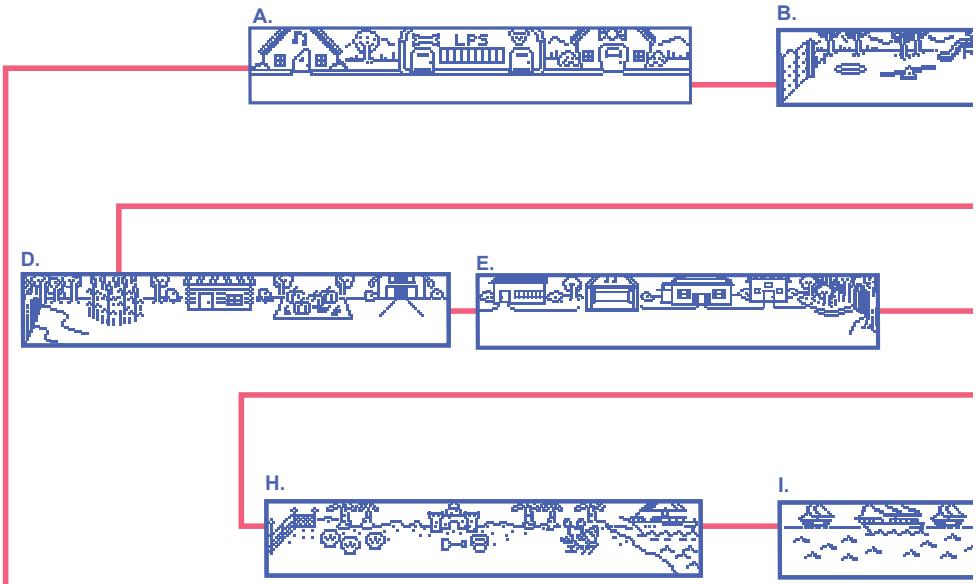
A. Town B. Park C. Pond D. Farm E. Town F. Forest G. Stream H. Beach I. Lake J. Island
F A. Town B. Park C. Pond D. Farm E. Town F. Forest G. Stream H. Beach I. Lake J. Island
A. Town B. Park C. Pond D. Farm E. Town F. Forest G. Stream H. Beach I. Lake J. Island
A. Town B. Park C. Pond D. Farm E. Town F. Forest G. Stream H. Beach I. Lake J. Island
A. Town B. Park C. Pond D. Farm E. Town F. Forest G. Stream H. Beach I. Lake J. Island
A. Town B. Park C. Pond D. Farm E. Town F. Forest G. Stream H. Beach I. Lake J. Island
A. Town B. Park C. Pond D. Farm E. Town F. Forest G. Stream H. Beach I. Lake J. Island
A. Town B. Park C. Pond D. Farm E. Town F. Forest G. Stream H. Beach I. Lake J. Island
A. Town B. Park C. Pond D. Farm E. Town F. Forest G. Stream H. Beach I. Lake J. Island

1 Backpack clip
2 Button - Lets you play with your pet
Grooming port
4 Food port
5 Select/enter
⑥ Browse/move
7 Food charm - Insert to feed your pet
Grooming charm - Insert to groom your pet
9 Connection ports - Connect other electronic pets here
10 Reset button
A PLAY MODE
Your toy comes packaged in "TRY ME" mode. To switch it to "PLAY" mode, just touch either one of the charms to its port during the "TRY ME" animation. After 2 minutes of non-activation, the toy will shut off. To turn back on, just touch one of the buttons on the front of the toy. All your game information, including stickers and stamps, will still be saved.
B HOW TO PLAY
10 little pets have escaped from the shop! It's up to you to find them all!
As you travel through locations, listen for a little pet crying! That's a sign you are near a lost pet. Locations include: Town, Park, Farm, Pond, Island, Forest, Beach, Stream and Lake.
When you find a lost pet, it will return to the shop and its habitat. A number on the screen will tell you how many pets are left to find.
As you look for the pets, you also will find numerous mini-games to play. Some games have a time limit (for example, staying on a surfboard for a certain number of seconds), and some games require you to perform a task a certain number of times (for example, catching a flying disc).
You will also meet many of your Littlest Pet Shop friends, who will invite you into their homes and play games with you!
To restart the game, press the RESET button. Or continue to explore and play more games!
If your pet isn't playful, it wants some attention. Use the groom charm to groom your pet, then press the toy button and play together - your pet will perk right up!
Be sure your pet is well-fed. Use the food charm to feed it. When your pet is feeling full, it'll shake its head when you try to give it more food. If your pet is hungry, it may move slowly.
To move your pet around, use either button to move through locations on the screen. For tips on playing all the different activities, go to littlestpetshop.com!
Your pet will always let you know what to do to keep it healthy and happy.
If your pet starts to move slowly, it's hungry! Use the food bowl charm to feed it. When it's full, it'll shake its head when you try to give it more food.
If your pet doesn't respond when you choose an activity, it's lonely and wants to play with you. Press the toy button and play together - your pet will perk right up!
If your pet turns its back to you, it needs some attention. Use the brush charm to groom your pet and make it happy again!
If your pet disappears from the screen... use either button to search for your pet. After a few clicks, you'll find it at home... using the facilities! Click either button to "clean up" after it, and your pet is ready to play again!
TROUBLESHOOTING
If toy does not respond, press the RESET button (you will need to use a pen or paperclip). All your pet's stickers and stamps will be saved. (To reset sticker and stamp info, press RESET button while holding down both left and right buttons on front of toy.)
Srtcantasi kliips
(2) Elektrominis ile oynamak icin bas
Grooming port
(4) Food port
5 Sec/Gir
Góz at/hareket etttir
(7) Food charm - Insert to feed your pet
Grooming charm - Insert to groom your pet
(9) Baglanti noktasi - Minisleri buradan birleşir
10 Hafiza sifirlama duğmesi
OYUN ZAMANI
10 little pets have escaped from the shop! It's up to you to find them all!
As you travel through locations, listen for a little pet crying! That's a sign you are near a lost pet. Locations include: Town, Park, Farm, Pond, Island, Forest, Beach, Stream and Lake.
When you find a lost pet, it will return to the shop and its habitat. A number on the screen will tell you how many pets are left to find.
As you look for the pets, you also will find numerous mini-games to play. Some games have a time limit (for example, staying on a surfboard for a certain number of seconds), and some games require you to perform a task a certain number of times (for example, catching a flying disc).
You will also meet many of your Littlest Pet Shop friends, who will invite you into their homes and play games with you!
To restart the game, press the RESET button. Or continue to explore and play more games!
If your pet isn't playful, it wants some attention. Use the groom charm to groom your pet, then press the toy button and play together - your pet will perk right up!
Be sure your pet is well-fed. Use the food charm to feed it. When your pet is feeling full, it'll shake its head when you try to give it more food. If your pet is hungry, it may move slowly.
To move your pet around, use either button to move through locations on the screen.
ELEKTROMINIS BAKIMI
A. Town B. Park C. Pond D. Farm E. Town F. Forest G. Stream H. Beach I. Lake J. Island
FIN A. Town B. Park C. Pond D. Farm E. Town F. Forest G. Stream H. Beach I. Lake J. Island
A. Town B. Park C. Pond D. Farm E. Town F. Forest G. Stream H. Beach I. Lake J. Island
A. Town B. Park C. Pond D. Farm E. Town F. Forest G. Stream H. Beach I. Lake J. Island
A. Town B. Park C. Pond D. Farm E. Town F. Forest G. Stream H. Beach I. Lake J. Island
A. Town B. Park C. Pond D. Farm E. Town F. Forest G. Stream H. Beach I. Lake J. Island
A. Town B. Park C. Pond D. Farm E. Town F. Forest G. Stream H. Beach I. Lake J. Island
A. Town B. Park C. Pond D. Farm E. Town F. Forest G. Stream H. Beach I. Lake J. Island

Backpack clip
2 Button - Lets you play with your pet
3 Grooming port
4 Food port
(5) Select/enter
⑥ Browse/move
Food charm - Insert to feed your pet
(8) Grooming charm - Insert to groom your pet
9) Connection ports - Connect other electronic pets here
(10) Reset button
A PLAY MODE
Your toy comes packaged in "TRY ME" mode. To switch it to "PLAY" mode, just touch either one of the charms to its port during the "TRY ME" animation. After 2 minutes of non-activation, the toy will shut off. To turn back on, just touch one of the buttons on the front of the toy. All your game information, including stickers and stamps, will still be saved.
B HOW TO PLAY
10 little pets have escaped from the shop! It's up to you to find them all!
As you travel through locations, listen for a little pet crying! That's a sign you are near a lost pet. Locations include: Town, Park, Farm, Pond, Island, Forest, Beach, Stream and Lake.
When you find a lost pet, it will return to the shop and its habitat. A number on the screen will tell you how many pets are left to find.
As you look for the pets, you also will find numerous mini-games to play. Some games have a time limit (for example, staying on a surfboard for a certain number of seconds), and some games require you to perform a task a certain number of times (for example, catching a flying disc).
You will also meet many of your Littlest Pet Shop friends, who will invite you into their homes and play games with you!
To restart the game, press the RESET button. Or continue to explore and play more games!
If your pet isn't playful, it wants some attention. Use the groom charm to groom your pet, then press the toy button and play together - your pet will perk right up!
Be sure your pet is well-fed. Use the food charm to feed it. When your pet is feeling full, it'll shake its head when you try to give it more food. If your pet is hungry, it may move slowly.
To move your pet around, use either button to move through locations on the screen. For tips on playing all the different activities, go to littlestpetshop.com!
Your pet will always let you know what to do to keep it healthy and happy.
If your pet starts to move slowly, it's hungry! Use the food bowl charm to feed it. When it's full, it'll shake its head when you try to give it more food.
If your pet doesn't respond when you choose an activity, it's lonely and wants to play with you. Press the toy button and play together - your pet will perk right up!
If your pet turns its back to you, it needs some attention. Use the brush charm to groom your pet and make it happy again!
If your pet disappears from the screen... use either button to search for your pet. After a few clicks, you'll find it at home... using the facilities! Click either button to "clean up" after it, and your pet is ready to play again!
TROUBLESHOOTING
If toy does not respond, press the RESET button (you will need to use a pen or paperclip). All your pet's stickers and stamps will be saved. (To reset sticker and stamp info, press RESET button while holding down both left and right buttons on front of toy.)
10 little pets have escaped from the shop! It's up to you to find them all!
As you travel through locations, listen for a little pet crying! That's a sign you are near a lost pet. Locations include: Town, Park, Farm, Pond, Island, Forest, Beach, Stream and Lake.
When you find a lost pet, it will return to the shop and its habitat. A number on the screen will tell you how many pets are left to find.
As you look for the pets, you also will find numerous mini-games to play. Some games have a time limit (for example, staying on a surfboard for a certain number of seconds), and some games require you to perform a task a certain number of times (for example, catching a flying disc).
You will also meet many of your Littlest Pet Shop friends, who will invite you into their homes and play games with you!
To restart the game, press the RESET button. Or continue to explore and play more games!
If your pet isn't playful, it wants some attention. Use the groom charm to groom your pet, then press the toy button and play together - your pet will perk right up!
Be sure your pet is well-fed. Use the food charm to feed it. When your pet is feeling full, it'll shake its head when you try to give it more food. If your pet is hungry, it may move slowly.
To move your pet around, use either button to move through locations on the screen. A lehetosegek mindegyikerei talasz tajekoztatast angol nyelven a www.littlestpetshop.com oldalon!
GONDOSKODÁS ICIKE-PICIKE BARATODROL
10 little pets have escaped from the shop! It's up to you to find them all!
As you travel through locations, listen for a little pet crying! That's a sign you are near a lost pet. Locations include: Town, Park, Farm, Pond, Island, Forest, Beach, Stream and Lake.
When you find a lost pet, it will return to the shop and its habitat. A number on the screen will tell you how many pets are left to find.
As you look for the pets, you also will find numerous mini-games to play. Some games have a time limit (for example, staying on a surfboard for a certain number of seconds), and some games require you to perform a task a certain number of times (for example, catching a flying disc).
You will also meet many of your Littlest Pet Shop friends, who will invite you into their homes and play games with you!
To restart the game, press the RESET button. Or continue to explore and play more games!
If your pet isn't playful, it wants some attention. Use the groom charm to groom your pet, then press the toy button and play together - your pet will perk right up!
Be sure your pet is well-fed. Use the food charm to feed it. When your pet is feeling full, it'll shake its head when you try to give it more food. If your pet is hungry, it may move slowly.
To move your pet around, use either button to move through locations on the screen. Aby znalez dobre rady, jak grac, wejdz na littlestpetshop.com!
OPIEKA
© POKONYWANIE PROBLEMÓW
10 little pets have escaped from the shop! It's up to you to find them all!
As you travel through locations, listen for a little pet crying! That's a sign you are near a lost pet. Locations include: Town, Park, Farm, Pond, Island, Forest, Beach, Stream and Lake.
When you find a lost pet, it will return to the shop and its habitat. A number on the screen will tell you how many pets are left to find.
As you look for the pets, you also will find numerous mini-games to play. Some games have a time limit (for example, staying on a surfboard for a certain number of seconds), and some games require you to perform a task a certain number of times (for example, catching a flying disc).
You will also meet many of your Littlest Pet Shop friends, who will invite you into their homes and play games with you!
To restart the game, press the RESET button. Or continue to explore and play more games!
If your pet isn't playful, it wants some attention. Use the groom charm to groom your pet, then press the toy button and play together - your pet will perk right up!
Be sure your pet is well-fed. Use the food charm to feed it. When your pet is feeling full, it'll shake its head when you try to give it more food. If your pet is hungry, it may move slowly.
To move your pet around, use either button to move through locations on the screen. Pour oblenir des conseils sur les différentes activités, va sur littlestpetshop.com!